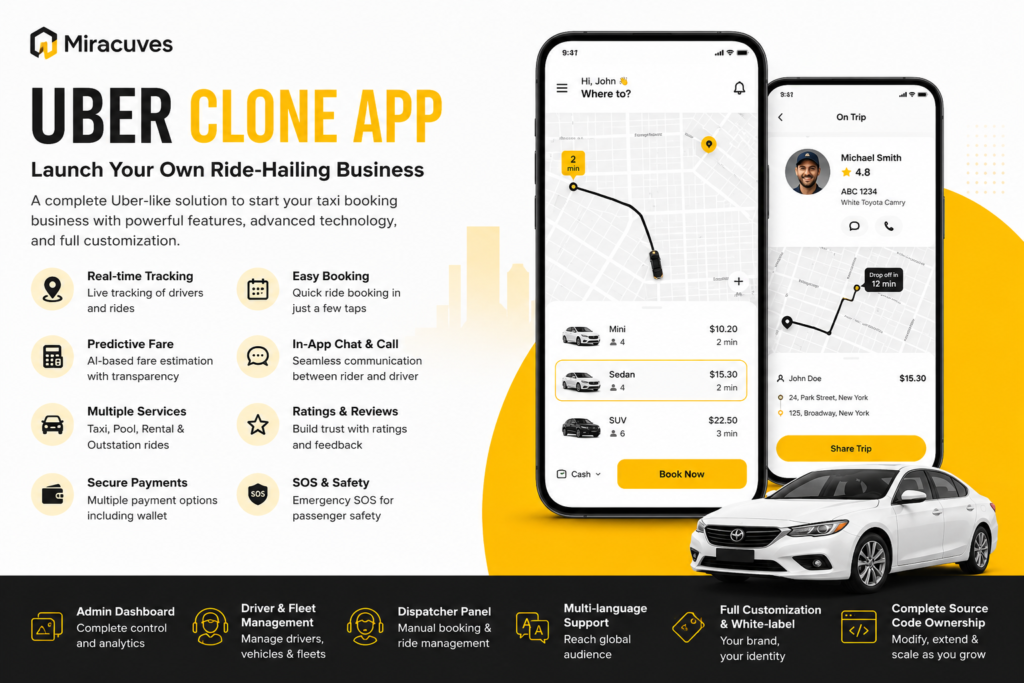

The way people book transportation has changed significantly. Passengers now expect to request rides, compare vehicle options, view estimated fares, track drivers, make payments, and receive trip updates through a mobile application.
This shift creates opportunities for mobility startups, taxi companies, fleet operators, and entrepreneurs. An Uber Clone App provides a ready-made technology foundation for connecting passengers with drivers and managing the complete ride-booking process.
However, success requires more than launching passenger and driver apps. A ride-hailing business must offer dependable vehicles, competitive fares, responsive support, strong safety processes, and enough active drivers to fulfil bookings quickly.
What Is an Uber Clone App?
An Uber Clone App is a customizable taxi-booking platform designed around the core workflows of modern ride-hailing services.
It usually includes dedicated applications and panels for:
- Passengers
- Drivers
- Dispatchers
- Fleet operators
- Platform administrators
Passengers can enter pickup and destination locations, select a vehicle category, view the estimated fare, request a ride, track the driver, complete payment, and rate the experience.
Drivers can manage availability, accept bookings, follow navigation, communicate with passengers, complete rides, and monitor earnings.
The admin team can control users, drivers, vehicles, service areas, pricing, commissions, payments, promotions, complaints, and business reports from one dashboard.
Why Start a Ride-Hailing Business?
Transportation needs are different in every market. Some cities need affordable daily taxis, while others have demand for airport transfers, corporate transportation, shared rides, bike taxis, rentals, or long-distance travel.
A localized platform can serve gaps that broader transportation companies may overlook.
Businesses can create ride-hailing services for:
- Daily city transportation
- Airport pickup and drop-off
- Corporate employee travel
- Women-focused mobility
- Bike and auto-rickshaw bookings
- Premium and luxury vehicles
- Hourly rentals
- Shared or pooled rides
- Medical transportation
- Outstation travel
Starting with one location or service category can make driver management, pricing, customer support, and marketing easier to control.
Main Components of an Uber Clone Platform
A complete ride-hailing ecosystem requires multiple connected interfaces. Each one supports a different stage of the booking and transportation process.
Passenger Application
The passenger app should make booking simple, fast, and transparent.
Users can register, enter pickup and destination points, select a preferred vehicle, check the estimated fare, and request transportation.
The application may support immediate bookings as well as scheduled rides. Advance bookings are especially useful for airport journeys, office meetings, medical appointments, events, and planned travel.
Important passenger features include:
- Real-time driver tracking
- Estimated arrival time
- Fare calculation
- Saved addresses
- Multiple destinations
- Ride history
- Digital receipts
- Secure payment methods
- In-app wallet
- Ratings and reviews
- Push notifications
- Emergency assistance
- In-app communication
The current solution supports daily rides, shared pool rides, rentals, real-time tracking, ride history, wallets, cards, cash payments, and advance scheduling.
Driver Application
The driver application helps service providers manage their daily work.
Drivers should be able to switch between online and offline status, receive nearby booking requests, review pickup information, accept or reject trips, and follow navigation instructions.
After completing a trip, drivers can review their earnings, completed rides, wallet balance, incentives, ratings, and payout information.
The application may also include document-management tools for:
- Driving licences
- Vehicle registration
- Insurance documents
- Identity verification
- Background checks
- Banking information
A clear driver interface helps reduce booking delays and allows service providers to manage trips more efficiently.
Dispatcher Panel
Some customers may prefer booking transportation by telephone rather than using a mobile application.
A dispatcher panel allows employees to create bookings manually, enter passenger details, assign available drivers, and monitor active rides.
This panel is especially useful for traditional taxi businesses, hotels, hospitals, corporate travel providers, and transportation call centres.
It also gives the business greater control when a driver cancels or when a booking needs to be reassigned quickly.
Fleet Management Panel
Fleet operators may own several vehicles and work with multiple drivers.
A dedicated fleet panel can help them manage:
- Driver profiles
- Vehicle records
- Ride assignments
- Document validity
- Trip performance
- Earnings
- Commissions
- Vehicle availability
Fleet functionality allows the platform to work with individual drivers, taxi agencies, rental businesses, and enterprise transportation providers.
Admin Dashboard
The admin dashboard acts as the operational centre of the ride-hailing business.
Administrators can manage:
- Passenger accounts
- Driver applications
- Vehicle categories
- Fleet partners
- Service locations
- Fare structures
- Surge pricing
- Platform commissions
- Active bookings
- Payments and payouts
- Discounts and promotions
- Complaints and disputes
- Reports and analytics
The current platform also includes automated driver matching, trip analytics, dispatcher controls, fare management, loyalty programs, referrals, communication tools, and emergency features.
Essential Features of an Uber Clone App
Real-Time Location Tracking
GPS-based tracking enables passengers to monitor the assigned driver before pickup and follow the journey after the ride begins.
It also allows administrators to monitor active trips and respond more effectively when a passenger or driver reports a problem.
Location data supports:
- Nearby-driver identification
- Estimated arrival times
- Route planning
- Distance calculation
- Fare estimation
- Live ride monitoring
Accurate location services improve coordination and reduce uncertainty during the booking journey.
Automated Driver Matching
The platform should automatically identify suitable drivers according to location, availability, vehicle category, and service area.
Efficient matching can reduce passenger waiting time and prevent drivers from receiving irrelevant booking requests.
The administrator may also configure how long a driver has to accept a request before it is offered to another provider.
Fare Estimation
Passengers generally want to understand the expected cost before confirming a ride.
The estimated price may be calculated using:
- Base fare
- Travel distance
- Estimated duration
- Vehicle category
- Waiting charges
- Taxes
- Tolls
- Platform fees
- Demand conditions
Administrators should be able to create separate fare rules for different locations, services, and vehicle categories.
Dynamic and Surge Pricing
Demand for rides changes throughout the day.
Pricing may increase during rush hours, public events, holidays, severe weather, or periods of limited driver availability.
Dynamic pricing can help attract more drivers during busy periods. However, the adjusted fare should always be shown before the passenger confirms the booking.
Transparent pricing protects user trust and reduces payment disputes.
Scheduled Ride Booking
Scheduled booking allows passengers to reserve transportation in advance.
This feature is useful for:
- Airport transfers
- Railway travel
- Business meetings
- Medical appointments
- Interviews
- School transportation
- Special events
The platform can send reminders to both passengers and drivers before the pickup time.
Multiple Ride Categories
A ride-hailing business can offer more than standard city transportation.
The platform can support:
- Economy rides
- Premium vehicles
- Shared pools
- Bike taxis
- Auto-rickshaws
- Hourly rentals
- Airport services
- Outstation journeys
- Corporate transportation
- Accessible vehicles
The current product supports daily rides, shared pool bookings, vehicle rentals, and other transportation workflows within one platform.
Secure Payment Methods
Different passengers prefer different payment options.
The platform can support:
- Cash
- Debit cards
- Credit cards
- Digital wallets
- In-app wallet balances
- Regional payment gateways
Every transaction should create a digital record. Passengers should be able to access receipts, while administrators should be able to monitor payments, refunds, commissions, and driver payouts.
Ratings and Reviews
After completing a ride, passengers can rate drivers and provide feedback.
Drivers may also rate passengers based on behaviour, communication, and booking reliability.
Ratings help administrators identify repeated complaints, low-quality service, suspicious accounts, and operational issues.
Serious complaints should be reviewed by the support team rather than handled only through automated scoring.
Emergency and Safety Features
Passenger and driver safety should remain a core part of the platform.
An SOS feature can connect users with emergency contacts, local services, or platform support.
Additional safety controls may include:
- Verified driver profiles
- Vehicle information
- Live trip sharing
- Complete ride history
- Emergency contacts
- Driver document approval
- In-app support
- Real-time journey tracking
The current platform includes an emergency contact and SOS feature alongside tracking and driver communication tools.
How the Ride-Booking Process Works
The passenger begins by creating an account and entering pickup and destination locations.
The platform displays available vehicle categories and estimated fares. After the passenger confirms the request, the system searches for a suitable nearby driver.
Once a driver accepts, the passenger receives the driver’s name, vehicle details, expected arrival time, and live location.
The driver reaches the pickup location and begins the journey. The platform records the ride status and route during the trip.
After reaching the destination, payment is completed using the selected method. A digital receipt is generated, and both parties can submit ratings.
This process creates a connected workflow covering registration, fare estimation, driver matching, tracking, transportation, payment, and feedback.
Revenue Models for an Uber Clone Business
Commission on Completed Rides
The platform can deduct a percentage or fixed fee from every completed booking.
This is one of the most widely used ride-hailing revenue models because income grows with ride volume.
Driver Subscription Plans
Drivers can pay a daily, weekly, or monthly fee to receive booking requests.
This model may appeal to drivers who prefer predictable platform costs instead of paying commission on every ride.
Booking and Convenience Fees
A small platform charge can be added to passenger bookings.
The fee should be included in the fare breakdown before the passenger confirms the ride.
Cancellation Charges
A cancellation fee may apply when a passenger or driver cancels after a defined period.
The policy should consider driver delays, incorrect locations, genuine emergencies, and other valid circumstances.
Corporate Transportation Plans
Businesses can purchase recurring transportation packages for employees, customers, guests, and airport travel.
Corporate accounts may provide predictable ride volume and recurring revenue.
Premium Services
Operators can charge higher fares for luxury vehicles, executive transportation, priority booking, specialized vehicles, or larger passenger groups.
Benefits of a Ready-Made Uber Clone Solution
Building a ride-hailing platform from zero requires passenger and driver applications, backend infrastructure, maps, GPS tracking, payment gateways, fare logic, dispatch tools, fleet controls, testing, and deployment.
A ready-made platform provides many of these essential workflows as an existing foundation.
Businesses can then focus on branding, driver onboarding, pricing, customer acquisition, legal requirements, and service quality.
Miracuves provides a white-label Uber Clone foundation with passenger and driver applications, dispatcher and fleet panels, an admin dashboard, complete source-code ownership, rebranding, deployment, app-publishing support, technical assistance, and a six-day ready-made rollout option.
Steps to Launch Your Ride-Hailing Platform
1. Select the Target Market
Choose the city, location, or customer group the platform will serve.
Study existing transportation options, average fares, driver availability, common customer complaints, and local regulations.
2. Define the Service Model
Decide which transportation categories will be available at launch.
Starting with one or two services can make pricing, driver allocation, marketing, and support easier to manage.
3. Create the Revenue Strategy
Define commissions, driver subscriptions, cancellation fees, corporate plans, and promotional offers.
The model should remain attractive to passengers while creating sustainable earnings for drivers and the platform.
4. Customize the Platform
Add the company name, logo, colour scheme, languages, currencies, payment methods, service zones, vehicle categories, and fare rules.
Only include the features required for the initial launch. Additional services can be introduced after the platform gains traction.
5. Verify Drivers and Vehicles
Create a clear onboarding and verification process.
Review driver identities, licences, vehicle documents, insurance records, background checks, and payout information before allowing drivers to accept rides.
6. Test Every Workflow
Test registration, ride selection, fare calculation, driver matching, tracking, scheduled bookings, payments, cancellations, refunds, ratings, and emergency support.
Testing should cover multiple devices, operating systems, network conditions, and payment outcomes.
7. Recruit Drivers Before Launch
A ride-hailing platform needs enough active drivers to provide reasonable pickup times.
Clearly explain commissions, subscription costs, incentives, payout schedules, service zones, and support processes during onboarding.
8. Start With a Focused Area
Launching within one city or service zone makes driver availability and customer support easier to manage.
The business can gather feedback, improve operations, and expand after the initial market becomes stable.
Common Mistakes to Avoid
One common mistake is launching with too few active drivers. Long waiting times and frequent cancellations can quickly discourage passengers.
Another mistake is creating an unclear pricing structure. Users should understand the estimated fare, surge pricing, tolls, service charges, and cancellation fees before booking.
Businesses should also avoid:
- Weak driver verification
- Inaccurate location tracking
- Delayed driver payouts
- Poor customer support
- Complicated booking steps
- Hidden charges
- Weak dispute management
- Insufficient safety controls
- Launching too many services at once
The platform must create value for passengers, drivers, fleet owners, dispatchers, and administrators.
Final Thoughts
An Uber Clone App can help mobility startups, taxi companies, and fleet operators launch a structured digital ride-hailing business without developing every component from the beginning.
It connects passengers, drivers, dispatchers, fleet partners, and administrators through booking, tracking, pricing, payments, communication, safety features, and business reports.
Technology provides the operational foundation, but long-term success depends on reliable drivers, transparent pricing, responsive customer service, passenger safety, and consistent ride quality.
By starting with a focused market and improving the service according to real booking behaviour, businesses can create a scalable ride-hailing platform that addresses local transportation needs and supports sustainable growth.