
Introduction
If your work involves 3D rendering, CAD modeling, video editing, or AI development, a standard laptop just won’t cut it. That’s the gap the Lenovo ThinkPad P16 Gen 2 was built to fill. It’s a mobile workstation designed for engineers, architects, and creative professionals who need desktop-class horsepower without being tied to a desk.
In this article, you’ll learn what’s inside the ThinkPad P16 Gen 2, how it performs in real-world workloads, how its display and battery life hold up, and how it stacks up against a very different kind of premium laptop the Samsung Galaxy Book5 Pro. We’ll also cover the pros, cons, and frequently asked questions so you can decide whether this machine deserves a spot on your desk (or in your backpack).
What Is the Lenovo ThinkPad P16 Gen 2?
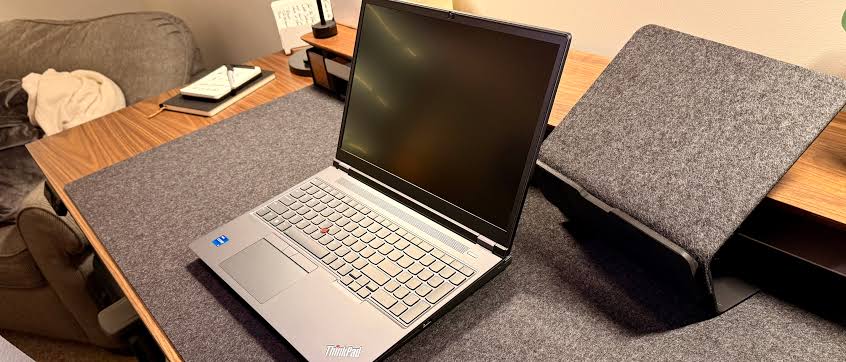
The ThinkPad P16 Gen 2 is Lenovo’s flagship 16-inch mobile workstation, sitting at the top of the ThinkPad P-series lineup. It replaces the original ThinkPad P16 Gen 1 and is built around 14th-generation Intel Core HX processors paired with professional-grade NVIDIA RTX Ada Generation graphics.
Unlike consumer laptops or even a typical gaming laptop, the P16 Gen 2 is certified for use with professional software such as AutoCAD, SolidWorks, Adobe Premiere Pro, and Blender. That certification matters because it means the drivers and hardware have been validated by independent software vendors (ISVs) to run these programs reliably a detail that matters a great deal to engineering and design teams.
Key Specifications at a Glance
- Processor: Up to Intel Core i7-14700HX (20 cores, 28 threads)
- Graphics: Up to NVIDIA RTX 5000 Ada Generation Laptop GPU
- Memory: Up to 192GB DDR5 RAM (upgradable)
- Storage: Dual M.2 SSD slots for expanded storage
- Display options: FHD+ IPS, QHD+ IPS (165Hz), 4K+ IPS, and 4K+ OLED, all 16 inches in a 16:10 aspect ratio
- Weight: Around 6.5 lbs
That level of configurability especially the upgradable RAM and dual storage bays is rare in 2026’s laptop market, where most manufacturers solder everything down for the sake of thinness.
Performance: Where the ThinkPad P16 Gen 2 Shines
Independent testing backs up Lenovo’s performance claims. In benchmark suites like SPECworkstation3, which evaluates CPU, graphics, I/O, and memory bandwidth across categories like media production, financial services, and product development, the <cite index=”1-1″>ThinkPad P16 Gen 2, powered by the Nvidia RTX 4000 Ada, quickly showed its superiority in multiple categories, demonstrating superior capability in workloads that stress the GPU</cite>.
The pattern held in graphics-focused benchmarks too. Using SPECviewperf, the industry standard for measuring professional graphics performance, <cite index=”1-1″>Lenovo consistently led by a wide margin over competing workstations, especially in tasks related to 3D rendering, with similar dominance shown in GPU-focused tools like LuxMark and OctaneBench</cite>. These results are meaningful because they solidify the P16 Gen 2’s position as a strong pick for rendering-heavy and creative workflows.
Notebookcheck’s deeper dive into the RTX 4000 Ada configuration echoes this. Their test unit paired the <cite index=”8-1″>Core i7-14700HX CPU with a 130 W Nvidia RTX 4000 Ada GPU, a notable performance uptick over the earlier Core i7-13700HX and 80 W RTX 2000 configuration from the first ThinkPad P16 Gen 2 review</cite>. Notebookcheck’s overall verdict was that the laptop <cite index=”8-1″>prioritizes performance even if it means a bigger, heavier, louder, and warmer system, making its 130 W RTX 4000 Ada a genuine powerhouse for those willing to accept the tradeoffs</cite>.
Not every category goes Lenovo’s way, though. When compared against HP’s ZBook lineup, <cite index=”1-1″>the ZBook G11 outperformed its AMD counterpart in CPU testing and both easily outpaced the ThinkPad, meaning while Lenovo dominated GPU-heavy benchmarks, HP’s ZBook Power G11 made its mark in CPU-bound tasks</cite>.
Bottom line: if your work leans heavily on the GPU rendering, simulation, AI inference the P16 Gen 2 is one of the strongest 16-inch workstations you can buy. If your workload is purely CPU-bound, competitors may have a slight edge.
Display Quality
Lenovo offers four panel options on the P16 Gen 2, and the differences matter more than you might expect. According to Digital Trends’ hands-on review, <cite index=”3-1″>Lenovo offers FHD+ (1920×1200) IPS, QHD+ (2560×1800) IPS, 4K+ (3840×2400) IPS, and 4K+ OLED panels, all 16 inches with a 16:10 aspect ratio</cite>. The <cite index=”3-1″>QHD+ IPS panel runs at up to 165Hz, while the other options are limited to a more standard 60Hz</cite>.
That’s an important tradeoff to understand: if you want smooth, high-refresh visuals for scrubbing through 3D models or video timelines, QHD+ is your pick. If sharpness is your priority say, for detailed CAD drafting 4K+ is the better choice, but you’ll be capped at 60Hz.
Color accuracy, however, didn’t fully impress reviewers. Digital Trends found that <cite index=”3-1″>Lenovo’s X-Rite Color Assistant utility, which offers various factory calibrations, didn’t provide particularly good results even in its best “Not calibrated” setting a real shortcoming for a laptop marketed toward color-sensitive professionals</cite>.
Battery Life and Thermals
This is the category where the ThinkPad P16 Gen 2 makes its biggest compromise. As one review summarized, <cite index=”6-1″>with powerful CPUs and GPUs onboard, the P16 Gen 2 is happiest when plugged into a wall, and while light use can yield a few hours of runtime, demanding tasks drain the battery quickly</cite>.
TechRadar’s testing confirmed this pattern directly, listing <cite index=”7-1″>poor battery life and a tendency to run hot under load among the laptop’s key drawbacks, alongside its 6.5-pound weight and lack of USB-C charging support</cite>.
This isn’t a design flaw so much as a physics problem: cramming a 130W GPU and a 20-core CPU into a portable chassis generates heat and draws serious power. Lenovo’s cooling system does keep temperatures from spiraling out of control, but don’t expect all-day battery life if you’re running rendering jobs away from an outlet.
Expandability: A Real Differentiator
One of the most practical advantages of the ThinkPad P16 Gen 2 is how easy it is to upgrade. As one in-depth review put it, <cite index=”6-1″>expandability is one of the biggest reasons professionals choose the P16 Gen 2, since it offers dual storage and upgradable memory that make it a dream for anyone who upgrades their hardware over time compared to soldered, locked-down ultrabooks</cite>.
For IT departments managing fleets of workstations, this matters. Instead of replacing an entire laptop when storage runs low or a project demands more RAM, technicians can simply open the back panel and upgrade components extending the laptop’s useful life and lowering total cost of ownership.
How Does It Compare to the Samsung Galaxy Book5 Pro?
The Samsung Galaxy Book5 Pro is a fundamentally different machine, and comparing the two highlights exactly what kind of user each laptop is built for.
The Galaxy Book5 Pro is a thin, light, all-day productivity laptop. It runs on <cite index=”16-1″>a power-efficient Intel Core Ultra Series 2 “Lunar Lake” processor</cite> rather than a high-wattage HX chip, and it prioritizes battery life and portability over raw performance. In fact, PCWorld’s testing found the <cite index=”16-1″>Galaxy Book5 Pro lasted 1,395 minutes nearly 24 hours in their standard battery benchmark</cite>, a figure the ThinkPad P16 Gen 2 simply cannot approach.
The Galaxy Book5 Pro also wins on portability. Laptop Mag noted that their review unit weighed <cite index=”13-1″>just 3.44 pounds, delightfully light for a 16-inch laptop, with gaming and graphics performance getting a noticeable bump from newer Intel Arc integrated graphics</cite>. Compare that to the P16 Gen 2’s 6.5-pound chassis, and it’s clear these laptops serve very different lifestyles.
Where the Galaxy Book5 Pro falls short is raw compute power. It uses integrated graphics rather than a discrete workstation GPU, which makes it unsuitable for CAD, 3D rendering, or GPU-accelerated AI workloads the exact tasks the ThinkPad P16 Gen 2 is engineered to excel at. As one reviewer summarized, the Galaxy Book5 Pro is <cite index=”18-1″>an excellent business laptop, but it lacks the equipment to fully justify the “Pro” label typically reserved for workstation-class machines</cite>.
Quick Comparison
| Feature | ThinkPad P16 Gen 2 | Galaxy Book5 Pro |
| Best for | CAD, 3D rendering, AI workloads | Portability, productivity, battery life |
| GPU | Discrete NVIDIA RTX Ada (up to RTX 5000) | Integrated Intel Arc |
| Weight | ~6.5 lbs | ~3.4–3.5 lbs |
| Battery life | Short under load | Up to ~24 hours |
| Upgradability | High (RAM, dual SSD) | Limited/soldered |
If you need workstation-grade performance, the ThinkPad P16 Gen 2 wins outright. If you want an ultra-portable machine for meetings, writing, and browsing with occasional light creative work, the Galaxy Book5 Pro is the better fit.
Real-World Use Case
Consider a structural engineering firm running finite element analysis (FEA) simulations and detailed CAD drafting throughout the day. A thin-and-light laptop like the Galaxy Book5 Pro would struggle to render complex assemblies smoothly and could throttle under sustained GPU load. The ThinkPad P16 Gen 2, with its discrete RTX Ada GPU and expandable memory, is built specifically to handle that kind of sustained, GPU-intensive workload plus, engineers can add more RAM or a second SSD as project files grow, without buying an entirely new machine.
Pros and Cons
Pros:
- Exceptional GPU performance for rendering, CAD, and AI workloads
- Multiple high-quality display options, including a 165Hz QHD+ panel
- Highly upgradable RAM and dual storage slots
- Comfortable keyboard and durable ThinkPad build quality
- ISV-certified for professional software
Cons:
- Heavy at roughly 6.5 lbs
- Runs hot and loud under sustained load
- Weak battery life away from a power outlet
- No USB-C charging support
- Factory color calibration underwhelms for color-critical work
Frequently Asked Questions
Is the Lenovo ThinkPad P16 Gen 2 good for gaming? It can run games well thanks to its powerful discrete GPU, but it’s not designed or marketed as a dedicated gaming laptop. Workstation GPUs like the RTX Ada series prioritize stability and professional certification over gaming-optimized drivers, so a true gaming laptop with a GeForce RTX GPU may deliver better frame rates for the same price.
Can I upgrade the RAM and storage later? Yes. This is one of the P16 Gen 2’s biggest advantages — it supports up to 192GB of DDR5 RAM and has dual M.2 SSD slots, making future upgrades straightforward.
How long does the battery last? Battery life is a known weak point. Expect only a few hours under light use, and significantly less when running demanding workloads like rendering or simulation.
Is the ThinkPad P16 Gen 2 or the Samsung Galaxy Book5 Pro better for a student? For most students, the Galaxy Book5 Pro’s lighter weight and much longer battery life make it the more practical daily driver. The ThinkPad P16 Gen 2 is overkill unless the student is studying engineering, architecture, or a similarly compute-intensive field.
What’s the starting price? Base configurations of the ThinkPad P16 Gen 2 start at just under $2,619, according to Digital Trends’ review, with pricing rising quickly as you add more powerful GPU and display options.
Conclusion
The Lenovo ThinkPad P16 Gen 2 isn’t trying to be everything to everyone and that’s precisely its strength. It’s a purpose-built mobile workstation for professionals who need serious GPU power, expandable memory, and ISV-certified reliability, and it delivers on all three fronts. The tradeoffs weight, heat, and battery life are the price of that performance, and for its target audience, that’s a price worth paying.
If your priority is portability and all-day battery life instead, the Samsung Galaxy Book5 Pro is worth a look, though it can’t match the P16 Gen 2’s workstation-class muscle.
What’s your take? If you’ve used the ThinkPad P16 Gen 2 or are choosing between it and the Galaxy Book5 Pro, drop a comment below with your experience and share this article with a colleague who’s shopping for their next workstation.