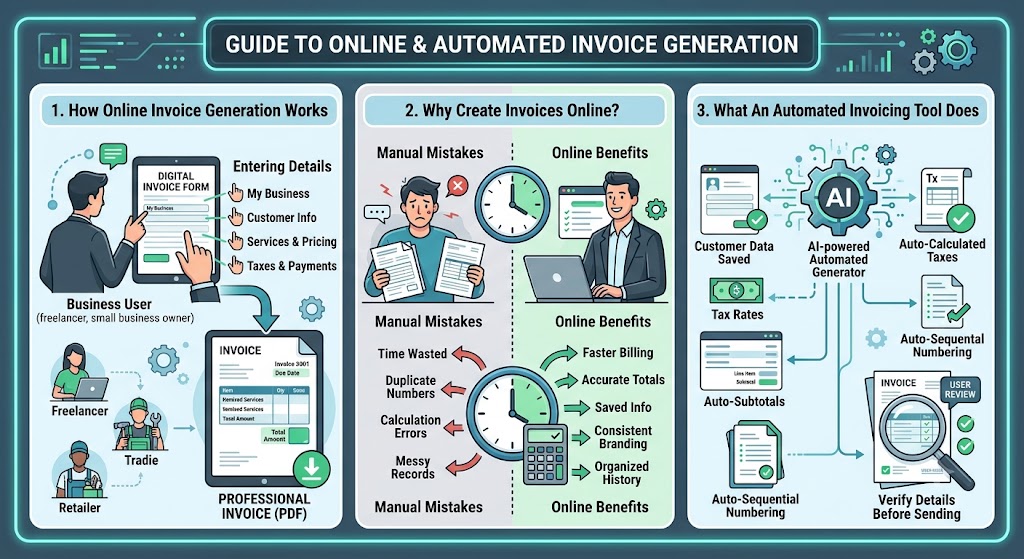

How does online invoice generation work?
Online invoice generation lets businesses create professional billing documents by entering company details, customer information, services, pricing, taxes, and payment terms into a structured digital form. Through invoice generation online, freelancers and small businesses can prepare accurate invoices faster, reduce manual formatting, and download completed documents in a shareable format.
Instead of creating every invoice from a blank document, users complete clearly labelled fields. The platform then organises the information into a clean invoice that customers can review easily.
A typical online invoicing process includes:
- Add your business name and contact details.
- Enter the customer’s billing information.
- Create a unique invoice number.
- Select the invoice and payment due dates.
- List the products or services provided.
- Add quantities, hours, rates, or prices.
- Include taxes and discounts.
- Review the final amount.
- Add payment instructions.
- Download the invoice as a PDF.
This process is useful for freelancers, consultants, contractors, agencies, tradies, retailers, and small businesses that need a reliable way to bill customers.
A professional invoice should clearly show:
- Business and customer details
- Invoice number
- Invoice and due dates
- Itemised products or services
- Quantity and pricing
- Taxes and discounts
- Total amount payable
- Accepted payment methods
Clear service descriptions are important. Instead of writing “work completed,” mention the actual service, such as website maintenance, monthly SEO support, plumbing repair, business consultation, or product delivery.
Why should businesses create invoices online?
Businesses should create invoices online because digital tools save time, improve accuracy, and create a consistent billing process. A structured system reduces repetitive document editing and makes it easier to organise customer details, payment deadlines, tax information, and completed invoices.
Manual invoicing can become difficult as a business grows. Copying old files may lead to incorrect customer names, duplicate invoice numbers, outdated payment details, or calculation mistakes.
Online invoice creation can help businesses:
- Prepare invoices faster
- Maintain consistent branding
- Reduce formatting mistakes
- Calculate totals more accurately
- Apply taxes and discounts clearly
- Reuse customer information
- Set visible payment deadlines
- Download professional PDF files
- Maintain organised billing records
Digital invoicing can also improve customer communication. When customers receive a clear invoice with itemised charges, an obvious due date, and simple payment instructions, they can process it without asking unnecessary questions.
This may support faster payments and healthier cash flow. Businesses can also follow up more confidently when every invoice has a clear reference number and payment deadline.
However, online tools do not remove the need for review. Users should always check customer details, quantities, rates, taxes, discounts, totals, and payment information before sending an invoice.
What does an automated invoicing tool do?
An automated invoicing tool completes routine billing tasks such as calculating totals, applying tax rates, reusing customer information, and organising invoice details. By using an automated invoice generator, businesses can reduce repeated data entry and create consistent documents without manually calculating every line or rebuilding the layout.
Automation is especially useful for businesses that create several invoices each week or work with recurring customers. Saved details can reduce the time spent entering the same business, customer, and payment information repeatedly.
Useful automated features may include:
- Automatic subtotal calculations
- Tax calculations
- Discount calculations
- Saved customer information
- Reusable service descriptions
- Automatic invoice numbering
- Recurring invoice support
- Payment due date settings
- PDF generation
- Invoice history
Automation can reduce mistakes, but the information entered must still be accurate. If the wrong rate, quantity, tax percentage, or customer detail is added, the generated invoice will also be incorrect.
Business owners should therefore review automated invoices before sending them. The system should support the billing process, not replace responsible checking.
How can you choose the right invoice generator?
Choose an invoice generator based on your billing volume, tax requirements, customer types, and preferred workflow. The right platform should be easy to use, create professional documents, support necessary calculations, and help you manage invoices without adding unnecessary complexity.
Before choosing a tool, check whether it allows you to:
- Add your logo and business details
- Customise customer information
- Include products and services
- Calculate taxes and discounts
- Set due dates
- Add payment instructions
- Create unique invoice numbers
- Download invoices as PDFs
- Access previous invoices
- Use the platform on different devices
A freelancer who creates a few invoices each month may only need a simple template and PDF download option. A growing agency may benefit from saved customer records, reusable services, and recurring invoices.
The invoice design should also be easy for customers to read. Avoid tools that produce crowded layouts or hide important details such as the total amount and payment deadline.
Security and accessibility also matter. Businesses should understand how information is stored and whether previous invoices can be accessed when required.
What should you check before sending an invoice?
Before sending an invoice, verify that every business, customer, service, pricing, tax, and payment detail is correct. Small mistakes can delay payment, create confusion, and require the document to be corrected and sent again.
Use this checklist:
- Confirm the business information.
- Check the customer’s billing details.
- Use a unique invoice number.
- Review invoice and due dates.
- Check item descriptions.
- Verify quantities and rates.
- Confirm taxes and discounts.
- Review the total amount.
- Add clear payment instructions.
- Save the invoice as a PDF.
Keep a copy of every completed invoice. Organising files by customer, date, or invoice number makes future record checks and payment follow-ups easier.
Frequently Asked Questions
Can online invoice generators calculate taxes?
Yes. Many invoice generators calculate taxes automatically after the correct tax rate and taxable amounts are entered.
Is automated invoicing suitable for freelancers?
Yes. Freelancers can use automated invoicing to save customer details, calculate totals, create consistent invoices, and reduce repetitive administrative work.
Should an online invoice be sent as a PDF?
Yes. PDF format keeps the layout fixed and makes the invoice easy for customers to open, download, print, and store.