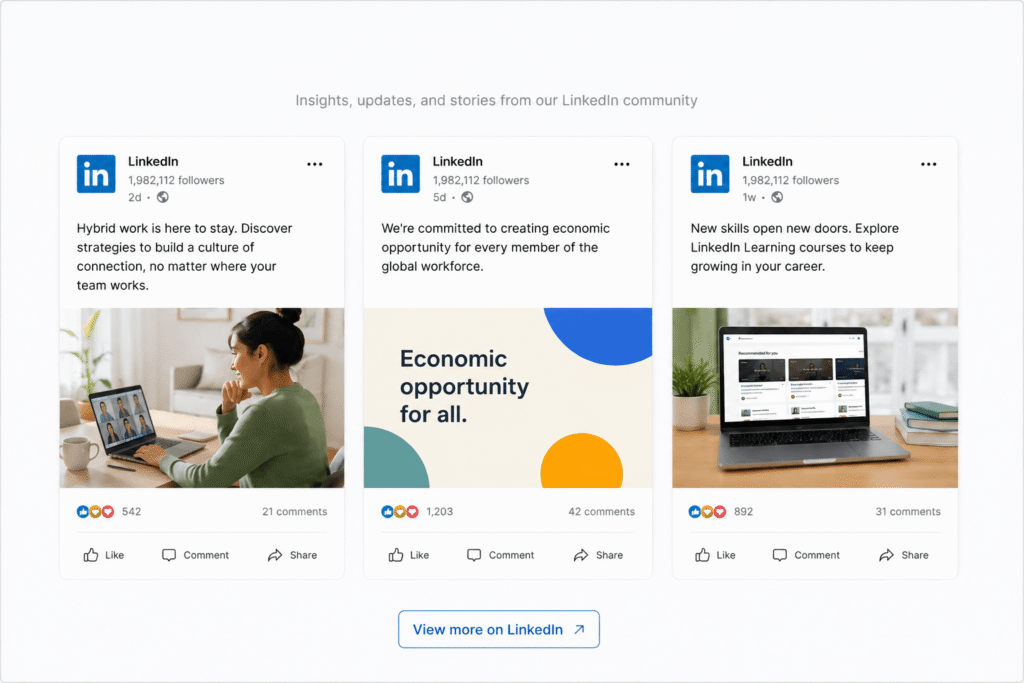

LinkedIn has evolved far beyond a professional networking platform. Today, it acts as a powerful B2B marketing channel where brands build authority, generate leads, and establish trust with potential customers.
But here’s the challenge.
Most businesses create valuable LinkedIn content that quickly disappears in users’ feeds after a few days. That means your best-performing posts, company updates, client wins, and thought leadership content often fail to deliver long-term value.
This is where adding a LinkedIn feed on website becomes a game changer.
By embedding a live LinkedIn feed directly on your website, businesses can showcase real-time professional content, increase visitor trust, improve engagement, and turn website traffic into qualified leads.
In this guide, you’ll learn how a LinkedIn feed on website helps with lead generation, why businesses are using LinkedIn widgets, and which social media widgets can improve your website experience.
What Is a LinkedIn Feed on Website?
A LinkedIn feed on website is a live stream of LinkedIn posts, company updates, employee content, or thought leadership posts embedded directly onto a website.
Using a LinkedIn widget or social media feed aggregator, businesses can automatically display LinkedIn content on:
- Homepages
- Landing pages
- SaaS websites
- Agency websites
- Career pages
- Event websites
- Product pages
- Blog sections
Instead of manually updating content, the feed refreshes automatically whenever new posts are published on LinkedIn.
This creates a more dynamic and engaging website experience for visitors.
Why Businesses Are Embedding LinkedIn Feeds on Their Websites
Modern buyers trust authentic content more than polished advertising.
Before making a purchase decision, users often look for:
- Company credibility
- Industry expertise
- Customer interactions
- Team activity
- Business updates
- Thought leadership content
A LinkedIn feed helps brands showcase all of this naturally.
When visitors see active LinkedIn updates directly on a website, it creates social proof and signals that the business is active, professional, and trustworthy.
This is especially important for:
- B2B businesses
- SaaS companies
- Agencies
- Consultants
- Event companies
- Recruiters
- Professional service providers
How a LinkedIn Feed on Website Helps Generate Leads
1. Builds Instant Trust
Trust is one of the biggest factors in lead generation.
A website with a live LinkedIn feed looks more authentic because visitors can see:
- Real company activity
- Industry insights
- Employee engagement
- Customer interactions
- Event participation
- Business achievements
This transparency helps reduce hesitation and increases conversion potential.
2. Keeps Your Website Fresh
Many business websites become outdated quickly.
Static pages rarely encourage repeat visits.
A LinkedIn feed automatically updates with fresh professional content, helping your website appear more active and relevant.
Fresh content also improves user engagement and can positively impact SEO signals like:
- Time on site
- Bounce rate
- User interaction
3. Showcases Thought Leadership
Thought leadership plays a major role in B2B lead generation.
Embedding LinkedIn posts allows businesses to display:
- Industry opinions
- Trend analysis
- Expert advice
- Case studies
- Webinar promotions
- Product updates
This positions your brand as an authority in your industry.
4. Increases Social Proof
People trust businesses that others engage with.
A LinkedIn feed acts as live social proof by showing:
- Likes
- Comments
- Professional engagement
- Community discussions
- Employee advocacy
This helps visitors feel more confident about contacting your business.
5. Improves Website Engagement
Visual and interactive content keeps users engaged longer.
Instead of reading only static text, visitors can browse:
- Videos
- Carousel posts
- Event updates
- Polls
- Infographics
- Team highlights
This creates a more engaging website experience.
Best Places to Add a LinkedIn Feed on Website
Not every page needs a social feed.
To maximize lead generation, place your LinkedIn widget strategically.
Homepage
Show visitors your latest company activity and professional updates immediately.
Landing Pages
Embedding LinkedIn feeds on lead-generation landing pages increases trust and credibility.
Career Pages
Show company culture, employee achievements, and workplace activities.
Event Pages
Display event announcements, speaker updates, and attendee engagement.
Blog Pages
Add LinkedIn posts related to your content topics to increase engagement.
SaaS Product Pages
Showcase product launches, feature announcements, and customer success stories.
Best LinkedIn Feed Widgets for Websites
Several tools allow businesses to embed a LinkedIn feed on website easily without coding.
1. Tagembed
Tagembed is one of the most popular tools for embedding LinkedIn feeds on websites.
It offers:
- Responsive LinkedIn widgets
- Custom layouts
- Real-time feed updates
- Moderation features
- Website performance optimization
- Easy integrations with WordPress, Shopify, Wix, and Squarespace
Tagembed also supports multiple social media widgets including:
- Instagram widget
- TikTok widget
- Facebook widget
- Google Reviews widget
- YouTube widget
This makes it ideal for brands wanting a complete social media feed aggregator solution.
2. Taggbox
Taggbox focuses more on UGC and social proof marketing.
It works well for businesses running campaigns and showcasing community engagement.
3. Elfsight
Elfsight provides easy no-code LinkedIn widgets with customizable designs and responsive layouts.
It’s especially useful for small businesses and creators wanting simple website integrations.
Best Practices for Embedding a LinkedIn Feed on Website
1. Keep the Design Clean
Avoid overcrowding pages with too many widgets.
Choose layouts that match your website branding.
2. Moderate Your Feed
Not every LinkedIn post belongs on your website.
Use moderation features to highlight only relevant and high-performing posts.
3. Optimize for Mobile
Your LinkedIn feed widget should be fully responsive across devices.
Most website traffic now comes from mobile users.
4. Prioritize Website Speed
Heavy widgets can slow down website performance.
Use lightweight social media feed aggregators optimized for fast loading.
5. Combine Feeds Strategically
Instead of adding every social platform everywhere, choose the most relevant widgets for each page.
Example:
- LinkedIn feed for B2B pages
- Instagram widget for portfolio pages
- Google Reviews widget for service pages
Frequently Asked Questions
How do I add a LinkedIn feed to my website?
You can use a LinkedIn widget or social media feed aggregator tool like Tagembed or Elfsight to embed a live LinkedIn feed on your website without coding.
Is a LinkedIn feed on website good for lead generation?
Yes. A LinkedIn feed helps build trust, showcase expertise, increase engagement, and improve social proof, which can positively impact lead generation.
Which is the best LinkedIn widget for websites?
Tagembed, Elfsight, and Taggbox are among the most popular LinkedIn widget tools for websites.
Can I embed multiple social media feeds on my website?
Yes. Many social media aggregator tools allow businesses to embed Instagram feeds, LinkedIn feeds, Google Reviews, YouTube videos, TikTok feeds, and more in one place.
Why should businesses use social media widgets?
Social media widgets help websites stay fresh, improve engagement, increase trust, showcase social proof, and create a more interactive user experience.