
What is the easiest way to create a professional invoice?
The easiest way to generate invoices for free is to use an online invoicing tool that organizes your business details, customer information, services, prices, taxes, and payment terms in a professional format. This approach saves time, reduces calculation errors, and removes the need to design every invoice manually.
Whether you are a freelancer, contractor, consultant, tradie, or small business owner, invoicing is an essential part of getting paid. A clear invoice tells your customer what they purchased, how much they owe, and when the payment is due.
Creating invoices manually in Word or spreadsheets may work at first, but it can become difficult as your customer base grows. Copying previous files can also cause mistakes, including duplicate invoice numbers, outdated customer details, incorrect pricing, or forgotten payment terms.
An online invoice tool gives you a structured process. You enter the required information, review the amounts, and prepare a document that is ready to send.
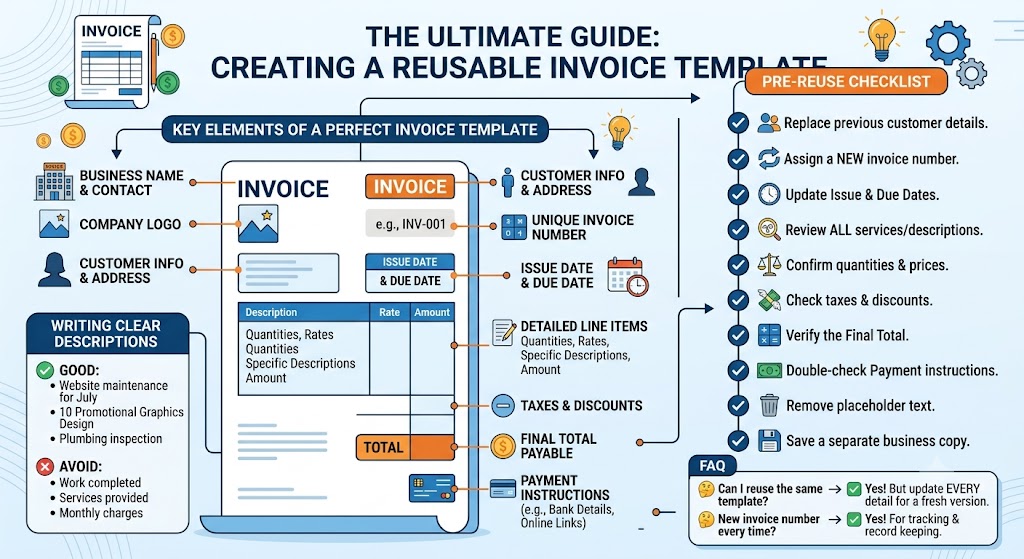
A complete professional invoice should include:
- Your business name and contact information
- Your business address and tax details, when applicable
- The customer’s name and billing address
- A unique invoice number
- The invoice issue date
- The payment due date
- Clear descriptions of products or services
- Quantity, hours, or units provided
- Individual rates or prices
- Taxes and discounts
- The subtotal and final amount payable
- Accepted payment methods
- Clear payment instructions
Descriptions should be specific and easy to understand. Avoid using broad phrases such as “work completed” or “professional services.”
Use descriptions like:
- Website maintenance for July
- Five social media graphics for a promotional campaign
- Three hours of electrical repair work
- Monthly digital marketing support
- Plumbing inspection and leak repair
Specific descriptions help customers understand every charge and reduce unnecessary questions.
How can free online invoicing help you get paid faster?
Free online invoicing can support faster payments by making your invoices accurate, easy to read, and simple to process. When customers can immediately see the total, due date, and payment method, they are less likely to delay payment because of missing or confusing information.
Follow these practical steps to improve your billing process:
- Create the invoice promptly
Send your invoice as soon as the work is completed or according to the agreed billing schedule. Waiting several days can also delay the customer’s approval process.
- Use a unique invoice number
Every invoice should have its own reference number. A simple format such as INV-001, INV-002, or CLIENT-2026-01 can make tracking easier.
- Add a clear payment deadline
Avoid vague wording such as “pay soon.” Use a specific due date or terms such as due within 7, 14, or 30 days.
- Include complete payment instructions
Explain how the customer can pay. Add the relevant bank details, payment link, or accepted payment methods.
- Review every detail
Check the customer’s name, service descriptions, prices, taxes, discounts, and total amount before sending the invoice.
- Keep a saved copy
Maintain copies of sent invoices for accounting, tax reporting, payment tracking, and future customer queries.
- Follow up professionally
When an invoice becomes overdue, send a polite reminder that includes the invoice number, original due date, outstanding amount, and payment instructions.
A consistent invoicing process also improves your professional image. Customers are more likely to trust a business that provides accurate, organized, and transparent billing documents.
Free invoicing tools are especially useful for businesses that do not need complicated accounting systems. They provide a simple way to create polished invoices while keeping costs low.
Frequently Asked Questions
Can I create an invoice without accounting software?
Yes. You can create a professional invoice using an online invoicing tool without purchasing full accounting software. Enter your business, customer, pricing, tax, and payment details, then review the invoice before sending it.
What payment terms should I use on an invoice?
Common payment terms include due on receipt, 7 days, 14 days, or 30 days. Choose terms that match your agreement with the customer and display the exact due date clearly.
Should every invoice have a unique number?
Yes. A unique invoice number helps you track payments, organize records, locate previous transactions, and prevent confusion between different customers or projects.