
You can create a professional invoice by entering your business details, customer information, products or services, prices, taxes, and payment terms into a structured online form. Using an invoice maker free online helps organise these details, calculate totals, and produce a clear document without requiring paid accounting software.
A professional invoice should make the transaction easy to understand. The customer should immediately see who issued it, what was supplied, how much they owe, when payment is expected, and which payment method they should use.
A clear invoice can also help businesses reduce payment delays. When customers receive complete information in one place, they are less likely to contact the seller with questions about prices, deadlines, account details, or the services listed.
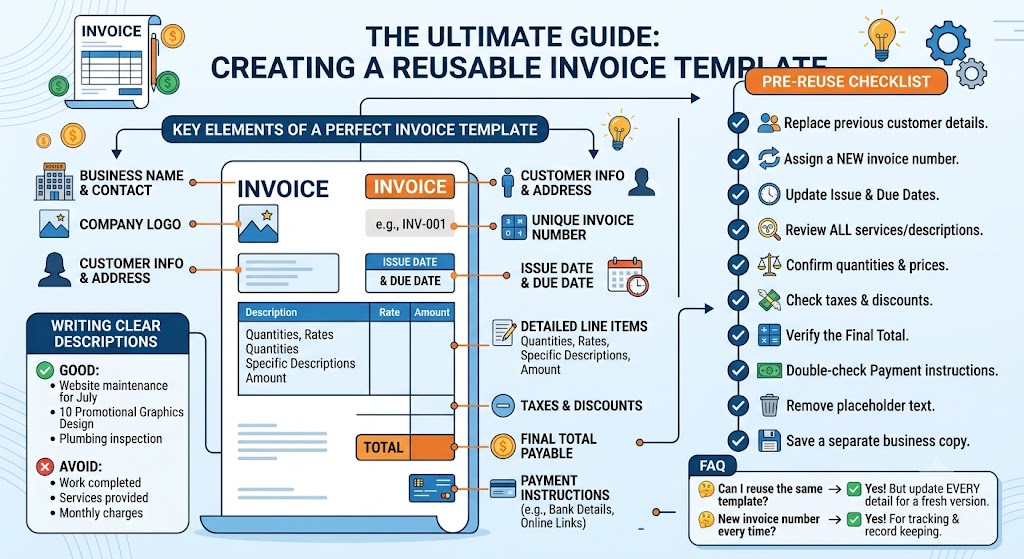
Include these essential details:
- Business name and contact information
- Customer name and billing address
- Unique invoice number
- Invoice issue date
- Payment due date
- Product or service descriptions
- Quantities, hours, or units
- Unit prices or service rates
- Taxes and discounts
- Additional charges, where applicable
- Final amount payable
- Payment terms and instructions
Your business information should appear clearly near the top of the invoice. Add your business name, address, phone number, email address, and company logo if available.
Customer information should be accurate and complete. An incorrect company name, billing address, or contact person may delay internal approval or cause the invoice to be sent to the wrong department.
Every invoice should also have a unique reference number. This helps businesses track payments, organise records, and locate previous transactions quickly.
Examples include:
- INV-2026-001
- INV-2026-002
- CLIENT-0061
- PROJECT-0132
- JUL-2026-015
The exact numbering format can vary, but it should remain consistent. Avoid reusing the same reference for different invoices because duplicated numbers can create confusion during bookkeeping and payment tracking.
How should products and services be described?
Descriptions should be specific and easy to understand. Avoid vague wording such as “services provided,” “work completed,” or “monthly charges” because these phrases do not explain what the customer received.
Use clearer descriptions such as:
- Website maintenance for July
- Monthly digital marketing support
- Plumbing inspection and repair
- Five hours of business consultation
- Design of ten social media graphics
- Product packaging and delivery
- Electrical installation and testing
- Monthly search engine optimisation services
Specific descriptions help customers compare the invoice with a proposal, contract, purchase order, timesheet, quotation, or project agreement.
If several services were provided, list them separately instead of combining everything into one line. This makes the invoice easier to review and gives the customer a clear breakdown of each charge.
For example, a website project may include:
- Homepage design
- Five service pages
- Mobile responsiveness
- Contact form setup
- Basic search optimisation
- Monthly website maintenance
Each line should show the quantity, number of hours, unit price, or agreed rate. The customer should be able to understand how the line total was calculated.
Why are clear payment terms important?
Clear payment terms tell the customer exactly when payment is due and what method they should use. Avoid vague phrases such as “pay soon” or “payment expected quickly.”
Use direct terms such as:
- Due on receipt
- Payment due within 7 days
- Payment due within 15 days
- Payment due within 30 days
- Payment due by a specific calendar date
The invoice should also include complete payment information, such as:
- Bank account name
- Account number
- Online payment link
- Card payment instructions
- UPI details
- Required invoice reference
- Billing contact information
If deposits, instalments, late fees, or early payment discounts apply, mention them clearly. These conditions should be discussed before the work begins so the customer is not surprised by additional charges.
What should I check before sending an online invoice?
Review every customer, service, price, tax, date, and payment detail before sending the final document. Online tools can simplify invoicing, but incorrect information can still lead to wrong totals, duplicated references, payment delays, and customer confusion.
Use this checklist:
- Confirm your business details.
- Check the customer’s billing information.
- Assign a unique invoice number.
- Verify the issue and due dates.
- Review each item description.
- Confirm quantities, hours, and prices.
- Check taxes and discounts.
- Review additional fees.
- Confirm the final amount.
- Verify payment instructions.
- Remove placeholder information.
- Save a business copy.
- Download the final PDF.
Automatic calculations can save time, but they still depend on the information entered. If the quantity, price, discount, or tax rate is incorrect, the final total will also be wrong.
Review every calculation before sending the document.
PDF is usually the best format because it preserves the layout and makes the invoice easy to email, print, download, and store. Keep the editable version for your records and send the finished PDF to the customer.
Businesses should organise completed invoices by customer, invoice number, project, month, financial year, or payment status. A consistent filing system makes previous documents easier to find and supports faster payment follow-ups.
Frequently Asked Questions
Can I make an invoice online without accounting software?
Yes. An online invoicing tool can help you organise billing details, calculate totals, add payment terms, and download a professional document without using complex accounting software.
Should every online invoice have a due date?
Yes. A clear due date tells the customer when payment is expected and makes overdue follow-ups easier.
What is the best format for sending an invoice?
PDF is usually the best format because it preserves the layout and is easy for customers to open, print, download, email, and store.