
Introduction
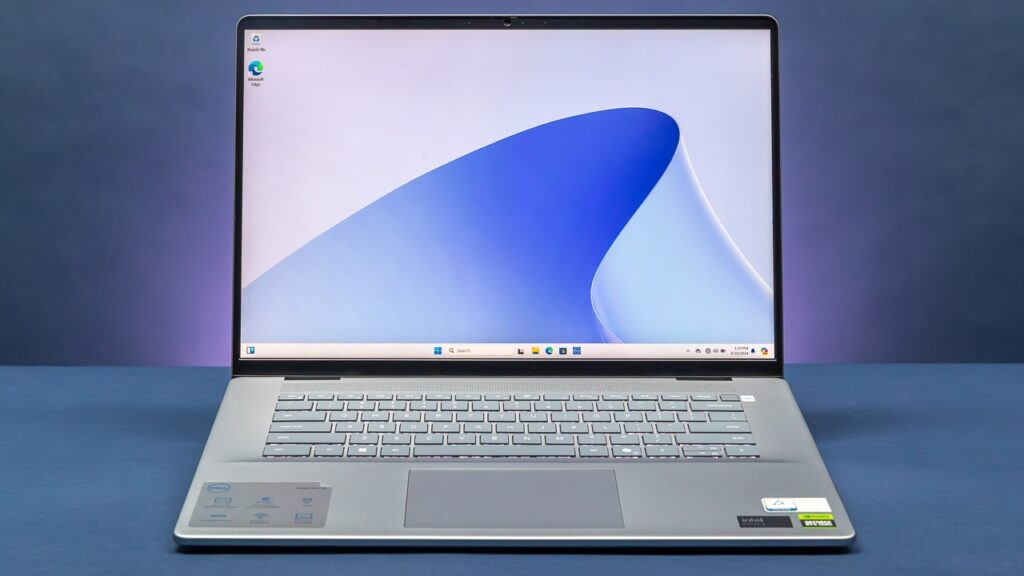
Mobile workstations used to mean one thing: bulk. You’d trade portability for power, lugging around a laptop that felt more like a desktop with a hinge. The Dell Precision 5690 challenges that trade-off. It packs Intel’s latest Core Ultra processors and NVIDIA’s professional-grade Ada Generation graphics into a chassis that’s genuinely comfortable to carry around a job site, a studio, or an airport terminal.
In this guide, you’ll learn exactly what the Precision 5690 offers, how it performs in real-world workloads, where it stands against competitors like the dual-screen Lenovo Yoga Book 9, and whether it deserves a spot on your shortlist. We’ll also touch on how it compares to lighter business machines like the Dell Latitude 7350, for readers weighing portability against raw workstation muscle.
By the end, you’ll have a clear, practical answer to the question every buyer asks before spending several thousand dollars on a laptop: is this the right machine for my work?
What Is the Dell Precision 5690?
The Precision 5690 is Dell’s compact 16-inch mobile workstation, positioned as the successor to the Precision 5680. Dell markets it as its smallest-footprint 16-inch mobile workstation, aimed at engineers, architects, video editors, data scientists, and other professionals who need workstation-class graphics without hauling around a 17-inch brick.
Unlike a typical business laptop, the 5690 is built around Intel’s Core Ultra H-series “Meteor Lake” processors paired with genuine NVIDIA RTX Ada Generation professional graphics not the gaming-oriented GeForce line. That distinction matters for anyone running CAD software, 3D rendering, or ISV-certified applications, since professional drivers are optimized and certified differently than consumer GPUs.
Key Specifications
- Processor options: Intel Core Ultra 5 135H up through Core Ultra 9 185H, all rated at 45W with vPro support
- Graphics: Ranges from integrated Intel Arc Pro graphics up to a discrete NVIDIA RTX 5000 Ada Generation GPU with 16GB of GDDR6 memory
- Memory: Soldered LPDDR5x, configurable up to 64GB (not user-upgradeable after purchase)
- Storage: Two Gen4 M.2 2280 slots, configurable up to roughly 8TB
- Display: Choices ranging from a 1920×1200 IPS panel up to a vivid 3840×2400 OLED display with strong color accuracy
- Connectivity: Intel Wi-Fi 7, Bluetooth 5.4, Thunderbolt 4 ports, HDMI, and an SD card reader
- Weight and build: Around 2.03 kg with an anodized aluminum chassis that resists flex
Because the RAM is soldered, it’s worth thinking carefully about configuration at purchase time you can’t add memory later the way you could on many older workstations.
Performance: Does It Actually Deliver?
Reviewers have generally been impressed by how much workstation-class capability Dell squeezed into this chassis. Independent testing found the Core Ultra 9 185H didn’t dramatically outperform the previous-generation Core i9-13900H found in the Precision 5680, suggesting the CPU gains here come more from efficiency and AI acceleration than raw multi-core speed. The built-in Neural Processing Unit (NPU), which Intel calls AI Boost, is designed to offload certain AI-driven tasks, though most creative and engineering software hasn’t fully caught up to exploiting it yet.
Where the 5690 clearly shines is graphics. The top-tier RTX 5000 Ada Generation GPU brings serious rendering power for 3D modeling, video editing, and simulation work, and reviewers have praised its ability to punch above its compact form factor in demanding creative and technical workloads.
Battery life is another pleasant surprise for a machine this powerful some testers reported close to 11 hours of use, which is unusual for a workstation-class laptop packing a discrete professional GPU.
Display Quality
The optional 4K OLED display is a genuine highlight. Testing has shown excellent color accuracy under 1.0 DeltaE after calibration, a level indistinguishable to the human eye along with wide color gamut coverage and high peak brightness. For photographers, video editors, and designers who need to trust what they see on screen, this is a meaningful selling point.
Dell Precision 5690 vs. Lenovo Yoga Book 9: Different Machines, Different Missions
It’s tempting to cross-shop the Precision 5690 against Lenovo’s dual-screen Yoga Book 9, but the two machines are built for fundamentally different jobs.
The Lenovo Yoga Book 9 is a productivity-focused 2-in-1 with two 13.3 to 14-inch OLED displays instead of a traditional keyboard deck, designed for multitasking, note-taking, and presentations. It ships with a detachable Bluetooth keyboard, mouse, stylus, and stand, and it runs on efficiency-focused Intel U-series or H-series chips with integrated graphics only. It’s an excellent tool for professionals who live in spreadsheets, browsers, and video calls, but it has no discrete GPU and isn’t built for CAD, rendering, or heavy computation.
The Precision 5690, by contrast, is a single-screen workstation with genuine professional graphics hardware. If your workload involves engineering software, 3D content creation, or GPU-accelerated computation, the Precision 5690 is in an entirely different performance class. If your priority is screen real estate for multitasking and a more experimental form factor, the Yoga Book 9’s dual-screen design solves a different problem entirely.
In short: choose the Precision 5690 for compute-heavy creative or technical work, and consider the Yoga Book 9 if your day revolves around juggling documents, communication, and multitasking rather than rendering or simulation.
Where the Dell Latitude 7350 Fits In
For readers comparing Dell’s own lineup, the Dell Latitude 7350 Detachable occupies yet another category. It’s a lightweight, tablet-style business 2-in-1 built around low-power Intel Core Ultra U-series chips with integrated graphics, designed for portability, all-day battery life, and collaboration features like a dedicated conferencing touchpad. It weighs well under two pounds and is aimed squarely at road warriors and meeting-heavy professionals not creative or engineering workloads.
If you need a workstation for demanding technical work, the Precision 5690 remains the right call. If your priority is the lightest possible machine for travel and meetings, the Latitude 7350 is worth a look instead.
Real-World Use Cases
- Architects and engineers running CAD or BIM software benefit from ISV-certified drivers and the discrete Ada Generation GPU options.
- Video editors and colorists get real value from the accurate, high-resolution OLED display and strong GPU-accelerated rendering.
- Data scientists working with GPU-accelerated machine learning workflows can lean on the RTX Ada graphics, though those needing massive VRAM should still consider desktop workstations for the heaviest jobs.
- Photographers benefit from the color-accurate display for editing work that demands precision.
Pros and Cons
Pros
- Genuine professional-grade GPU options, up to RTX 5000 Ada Generation
- Compact, lightweight chassis for a 16-inch workstation
- Excellent, color-accurate OLED display option
- Strong battery life for a machine in this performance category
- Sturdy aluminum build quality
- Modern connectivity, including Wi-Fi 7 and Thunderbolt 4
Cons
- Soldered, non-upgradeable RAM
- CPU gains over the prior generation are modest
- Premium configurations get very expensive
- Limited port selection compared to bulkier workstations
- No USB-A port on many configurations
Frequently Asked Questions
Is the Dell Precision 5690 good for gaming? It can handle games reasonably well thanks to its Ada Generation graphics, but it’s engineered and priced for professional workloads, not gaming. A dedicated gaming laptop will typically offer better price-to-performance for that purpose.
Can I upgrade the RAM later? No. The memory is soldered to the motherboard, so you should choose your RAM configuration carefully at purchase time 32GB is a sensible minimum for most professional workloads.
How does it compare to the Precision 5680? The 5690 introduces Intel’s Core Ultra “Meteor Lake” architecture and an NPU for AI acceleration, along with updated wireless standards. Raw CPU performance gains over the 5680 are relatively modest, but efficiency and platform features have improved.
Is the Lenovo Yoga Book 9 a substitute for the Precision 5690? Not for technical or creative workloads. The Yoga Book 9 is a productivity-oriented dual-screen device without discrete professional graphics, while the Precision 5690 is built for GPU-accelerated technical work.
Conclusion
The Dell Precision 5690 succeeds at something genuinely difficult: delivering real workstation-class graphics performance in a chassis that doesn’t feel like a burden to carry. Its display options, build quality, and battery life make it a compelling choice for architects, engineers, editors, and other professionals whose work depends on serious GPU horsepower. The trade-offs non-upgradeable memory, a steep price at the top end, and modest CPU generational gains are worth weighing against your specific workload before you buy.
If your priority is dual-screen multitasking rather than compute power, the Lenovo Yoga Book 9 is worth a look instead, and if ultralight portability for meetings and travel matters more than graphics performance, the Dell Latitude 7350 deserves consideration too.
Have you used the Dell Precision 5690 for your own work? Share your experience in the comments below, or pass this guide along to a colleague who’s weighing their next workstation purchase it might save them hours of research.