
How to Create a Professional Invoice Quickly and Easily
Creating an invoice is simple when you use a clear format that includes your business details, customer information, services, pricing, taxes, and payment terms. Instead of designing every invoice manually, a free invoice generator can help you prepare accurate invoices quickly while keeping your billing process organized and professional.
A well-prepared invoice should make it immediately clear what the customer is paying for, how much they need to pay, and when the payment is due. This is especially important for freelancers, independent professionals, consultants, and small businesses that send invoices regularly. A consistent invoicing process can save time, reduce mistakes, and make your business appear more reliable.
What Should You Include in an Invoice?
Whether you are charging for a product, project, or professional service, your invoice should contain the essential information needed to understand the transaction. Missing details can lead to confusion, payment delays, or unnecessary follow-up messages with customers.
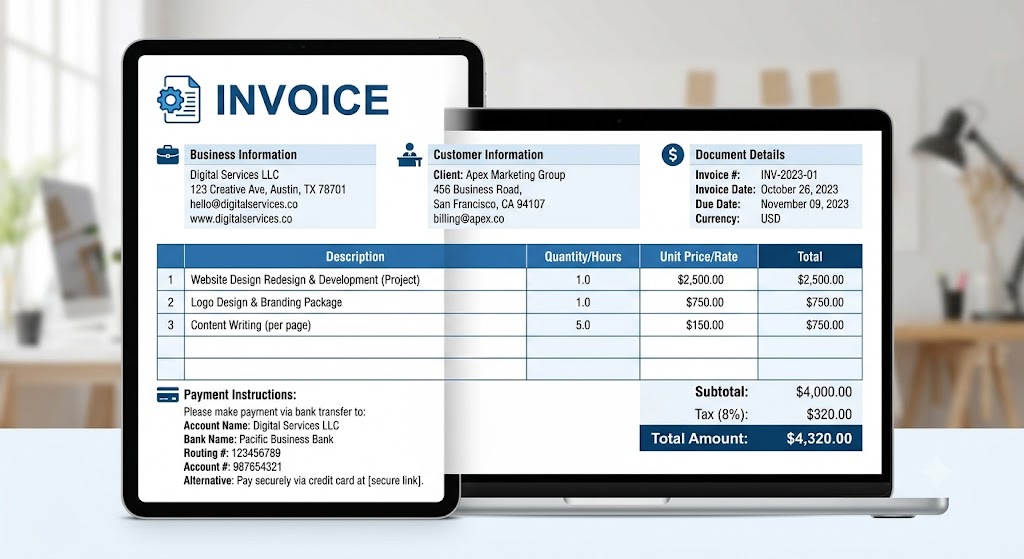
A useful invoice should contain:
- Business information: Add your business name, address, phone number, email address, and other relevant contact details.
- Customer information: Include the client’s name, business name if applicable, billing address, and contact details.
- Invoice number: Give every invoice a unique number so you can easily organize and track your records.
- Invoice date: Mention the date when the invoice was created or issued.
- Due date: Clearly state when the customer is expected to complete the payment.
- Service or product details: Describe each product or service clearly so the customer understands what they are being charged for.
- Pricing: Show quantities, rates, discounts, and applicable taxes separately when necessary.
- Total amount: Make the final amount due easy to identify.
- Payment instructions: Explain the available payment methods and provide any information the customer needs to complete the payment.
Using a consistent invoice structure also makes your financial records easier to manage. You can quickly identify which invoices have been paid, which are overdue, and which customers still need a payment reminder.
How Can You Make Invoicing Faster?
The easiest way to save time is to avoid entering the same information repeatedly. Keep your business details ready, use consistent descriptions for regular products or services, and consider using an invoice template or digital invoicing tool.
Before sending an invoice, check these important points:
- Confirm the customer’s name and contact information.
- Verify the invoice number and issue date.
- Check quantities, prices, discounts, taxes, and totals.
- Confirm the payment due date.
- Make sure the payment instructions are accurate and easy to understand.
- Review the invoice for spelling or calculation errors.
- Save a copy of the invoice for your records.
A streamlined invoicing process can reduce administrative work and help you get paid without unnecessary delays. It can also make it easier to maintain accurate financial records as your business grows.
Why Is a Professional Invoice Important?
A professional invoice does more than request payment. It communicates that your business is organized and pays attention to important details. Clear descriptions, accurate calculations, consistent formatting, and straightforward payment terms can improve the customer’s experience.
For freelancers and small businesses, using a repeatable invoicing process can also reduce the time spent on routine administrative tasks. Instead of creating a new design for every customer, you can follow the same structure and update only the transaction-specific information.
FAQ
Can I create an invoice without accounting knowledge?
Yes. A structured invoice format makes it easy to enter customer, service, pricing, tax, and payment information without advanced accounting skills. You simply need to ensure that the information is accurate and complete.
What makes an invoice professional?
A professional invoice is clear, accurate, properly itemized, and includes complete business, customer, payment, and transaction details. It should also clearly show the total amount due and payment deadline.
How can I create invoices more efficiently?
Using a consistent template or invoice generator can make the process faster. You can save standard business details, reuse service descriptions, and quickly prepare invoices without formatting everything from scratch.