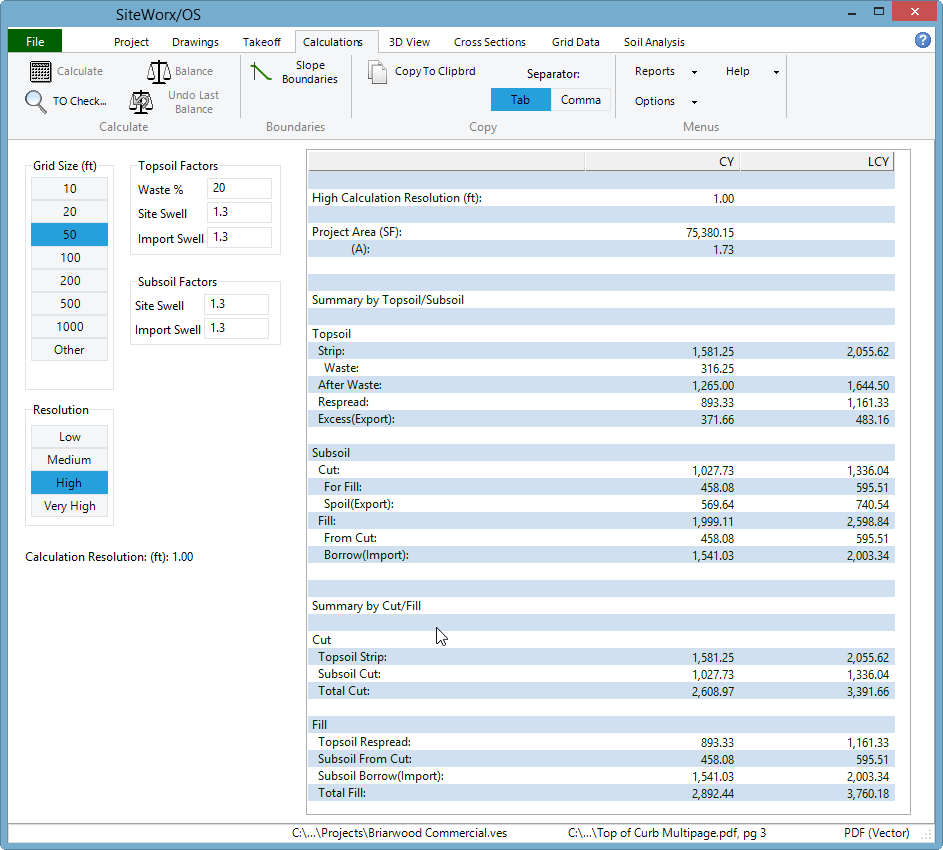

Efficient site planning requires precise calculations to manage resources and control costs. Site balancing is a crucial part of this process, ensuring cut and fill volumes are accurately distributed across the project. SiteWorx/OS makes this faster and simpler by modeling existing and proposed surfaces. By providing clear 3D representations and immediate calculations, it allows teams to manage projects with confidence, reducing errors and delays. Construction projects often involve many details, from soil layers to trenches, slopes, and boundaries. SiteWorx/OS handles all of these in one place. By converting digital drawings into precise measurements, it saves time and reduces mistakes. Teams can now plan materials, labor, and timelines efficiently.
Organize Projects Without Confusion
SiteWorx/OS structures work around intuitive tabs. The project tab defines the project, while the drawings tab allows importing files and setting scales. Elevations, boundaries, and areas are recorded in the takeoff tab, and results appear in the calculations tab automatically. This workflow ensures that estimators can keep all information organized and accessible, saving time and avoiding overlooked details.
Additionally, SiteWorx/OS lets users manage multiple pages and different file types in the same project. Each drawing can be described and annotated for clarity. This reduces confusion when dealing with large or complex sites and ensures that every measurement is recorded in the right place.
Instant Volume Calculations
Manually measuring cut, fill, and subgrade volumes can be time-consuming. SiteWorx/OS calculates these automatically, including trench, over-excavate, and backfill volumes. Boring logs allow cut volumes to be separated by soil type, while automatic checks highlight errors instantly. With SiteWorx/OS, teams can complete accurate material calculations in minutes, rather than hours.
The software also allows copying and excluding specific areas, which is useful for topsoil re-spread or selective grading. This feature saves both time and materials, ensuring the project stays on budget. Accurate calculations reduce waste and prevent underestimating or overestimating materials, which can lead to costly delays.
Visualize Every Detail
3D models in SiteWorx/OS provide a clear view of the existing and proposed site. Users can examine cut and fill locations, verify slopes, and see depth differences at any point. This visual clarity helps teams confirm measurements, spot potential problems early, and plan equipment and material placement efficiently.
Visual tools also make communication with the team easier. Contractors, supervisors, and engineers can view the same model and understand exactly where cuts, fills, or trenches are located. This reduces errors caused by miscommunication and ensures everyone works from the same accurate plan.
Handle Any File Format
Projects often include multiple file types. SiteWorx/OS works with PDFs, vector PDFs, DWG, DXF, and raster files. Contour lines and elevations can be imported in seconds, and layers can be isolated for precise measurements. Users can snap to points on vector files or trace lines from raster files, ensuring every calculation is accurate. Multiple drawings can be managed in a single project, improving workflow efficiency.
This flexibility also allows teams to combine old plans with new designs without worrying about compatibility. SiteWorx/OS handles both vector and raster files smoothly, so the team can focus on takeoff rather than file conversion.
Easy Adjustments and Edits
Errors in elevations or measurements can be corrected quickly. SiteWorx/OS allows users to edit incorrect data, copy areas, or exclude topsoil re-spread regions. Keyboard shortcuts and toolbar commands simplify complex operations, while real-time updates in 3D models keep the entire project consistent. These features reduce mistakes and speed up takeoff tasks significantly.
The software also makes adjusting slopes, contours, and trench details simple. Any change made is automatically reflected in volume calculations and visual models. This reduces the chance of overlooking small but critical adjustments.
Generate Reports Instantly
SiteWorx/OS produces detailed and clear reports with 3D graphics of volumes and site features. Data can be exported to Excel, Word, PDF, or DWG formats, and cloud storage ensures secure backups. These reports make sharing project results straightforward and support informed decision-making.
Teams can also use these reports for audits, client updates, and material orders. By keeping all data in one place, SiteWorx/OS ensures that the project remains transparent and easy to track from start to finish.
Improve Accuracy with Minimal Effort
Automatic calculations, site balancing adjustments, and visual confirmations reduce the chances of mistakes. Estimators can measure boundaries, spot elevations, sloping lines, and trench areas accurately and efficiently. Errors are minimized, and project teams can rely on the numbers for ordering materials, planning labor, and managing timelines effectively.
The software also helps in checking cross-sections and grids, ensuring that all aspects of the site are correctly accounted for before work begins. This level of precision improves decision-making and reduces delays caused by inaccurate measurements.
Wrap Up:
SiteWorx/OS streamlines every step in estimating takeoff software, from site balancing adjustments to 3D visualization of cut and fill volumes. It simplifies complex measurements, organizes project data, and produces accurate, actionable results. With SiteWorx/OS, tasks that once took hours can be completed in minutes, making takeoff and estimating faster, more reliable, and less prone to errors.
Experience faster and accurate site calculations today. Use SiteWorx/OS to boost your estimating efficiency and ensure every project runs smoothly.